LiDAR XT32M2X
GPS Sync / GPS Spoof Sync
The XT32M2X can synchronize to an external time source through the use of a 1 PPS signal together with timestamp data sent to the XT32M2X over a RS-232 serial line.
In order to do this with the SentiBoard, you need to
Configure a 1 PPS trigger
- Connect the SentiBoard to your computer, be sure to have done the SentiBoard Installation, and connect a terminal to the SentiBoard's config port
/dev/ttySentiboard00 - Configure one of the available triggers, e.g
oc1. Typec oc1andEnter. - Set the following config:
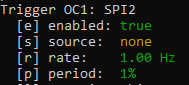
Period: 1%yields a pulse width of10ms(recommended to be>1ms). - Type
xandEnterto exit theoc1config menu. - Type
saveandEnterto permanently store the config changes. - Type
resetandEnterto restart the SentiBoard and apply the new settings.
Wire the trigger and GPS data signals
- If trigger
oc1was used, wire theSPI_2port's trigger and ground pin to the XT32M2X according to the XT32M2X's wiring scheme: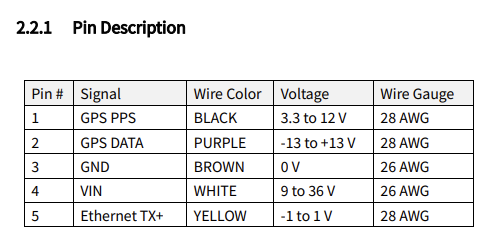
TheSPI_2trigger pin should attach to the GPS PPS pin (1) of the LiDAR. SentiBoard and XT32M2X should be connected to the sameGND. - Attach a USB-to-RS232 adapter (or use an RS-232 port directly) on the host computer, connected to the LiDAR's
GPS DATApin (2).
Spoof a GPS Time Message
- Connect the SentiBoard to your host computer running
SentiUtils, and receiveSentiTriggermessages from the SentiBoard (e.g in ROS). - When receiving a SentiTrigger message via
SentiUtils, construct an NMEA GPRMC string using the SentiTrigger's UTC header fields as timestamp. - Send the NMEA GPRMC string generated from the SentiTrigger packet to the LiDAR over the host's RS-232 connection.
- Verify that the XT32M2X has a
Lockon both theGPS (1PPS)and theNMEA (GPRMC)through the LiDAR's Web interface (default:192.168.1.201)
PTP
The XT32M2X supports PTP time synchronization and is a good fit to use with SentiBoard 2.0